Showing posts with label Web Finds. Show all posts

Wednesday, June 18, 2008

Albay in Google Earth

In the most recent Google Earth update last month, several towns and one city in the province of Albay now have high-resolution satellite imagery. These newly high-res areas include Ligao City, Guinobatan, Oas, Libon, Tiwi, Manito, Jovellar and Malinao. Camalig is also on high resolution but is partly hidden by clouds.

Among Albay's municipalities and cities, only Rapu-Rapu, parts of Polangui, and Pio Duran remain in low resolution. Legazpi City and Daraga first went high-res back in June 2006. The city of Tabaco and the towns of Sto. Domingo, Bacacay and Malilipot followed suit a few months later.

Browsing Google Earth is one of my favorite time wasters. Exploring both familiar and unfamiliar places through satellite imagery is what I call Google Earth sightseeing. It certainly provides a different perspective of the world around us. A great blog about Google Earth sightseeing is Vista Pinas, which features Filipino sights as seen from satellite images found in Google Earth and Google Maps.

Here are some screen grabs (click to enlarge) of newly high-res areas in Albay. Screen shots won't do justice, though. The best way to view these satellite images is through Google Earth.


Ligao City


Guinobatan


Manito

Jovellar

Tiwi

Monday, April 14, 2008

PicLens: 3D Image Viewing Experience


If you love browsing through media-rich sites such as Flickr or deviantART, here's a cool add-on you can install in your browser to enrich your image browsing and viewing experience. Now you don't have to just click through online photo galleries or a boring parade of small thumbnails. PicLens by CoolIris transforms your browser into a cool, full-screen 3D picture wall.

I found the PicLens interface quite fast, easy-to-use and intuitive. When you install PicLens, it adds a small 'play' icon on the images which you can click to open the superb full-screen 3D experience. Here you can drag, click, scroll and zoom through images with ease.

PicLens view of My Flickr gallery

PicLens is best viewed on Mozilla Firefox but it is also available for Internet Explorer and Safari. It works with a growing number of websites including Facebook, Friendster, and Image Searches for Google, Yahoo, etc.

For Firefox Users, click here to install PicLens. Visit the PicLens website for more details.

Monday, December 3, 2007

New Background Image for Christmas

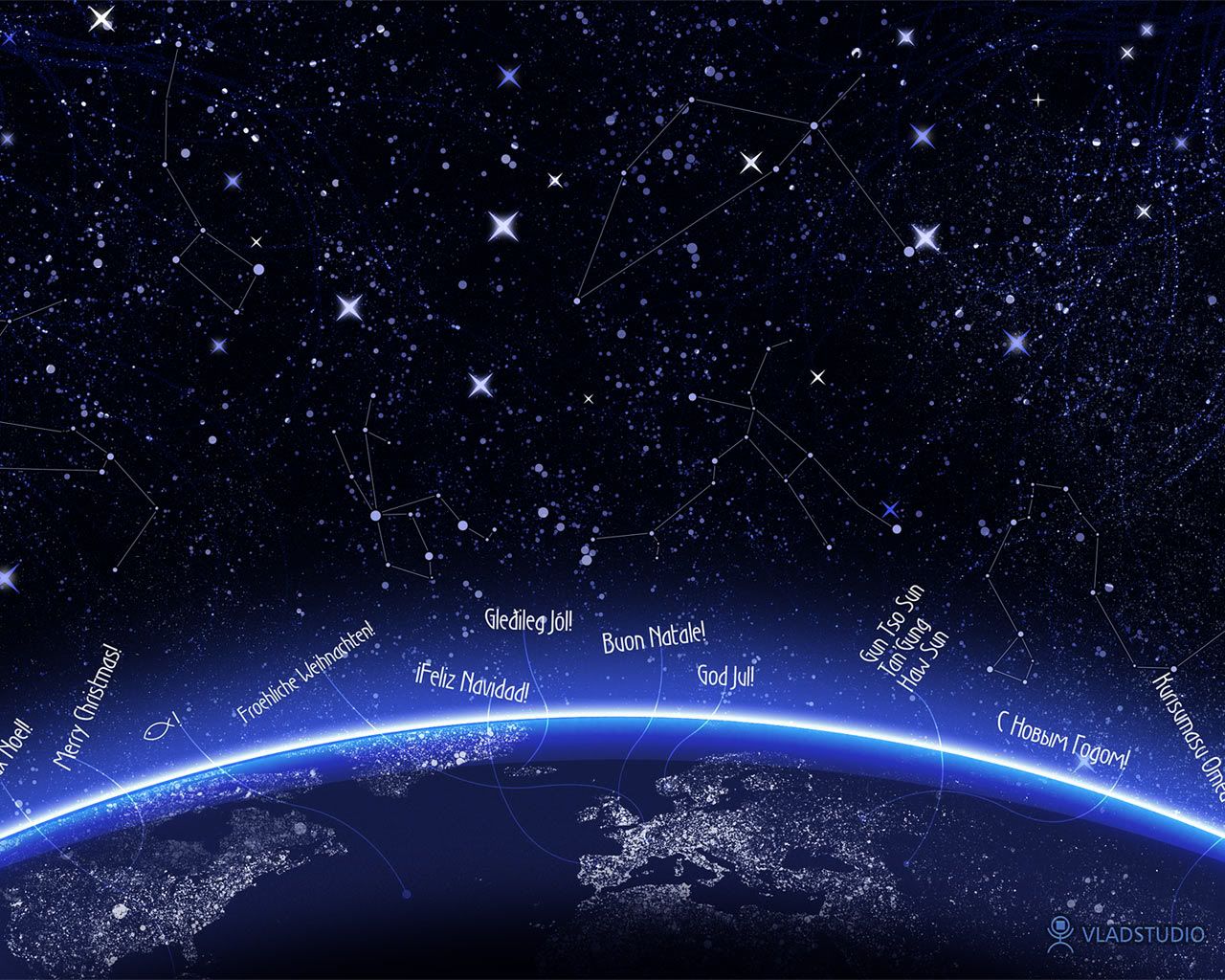
I hope I never outgrow Christmas. It's still my favorite time of the year. So, in observance of the coming Christmas season, I have a new background image, called 'Christmas Night', supposedly a wallpaper, courtesy of Vladstudio. It's basically a snapshot of the Christmas night sky complete with the constellations while the continents of the Earth shines brightly underneath. Christmas greetings in various languages surround the glowing planet. I like it, somehow. :-)

However, the Christmas greetings may not be visible in monitors with 1024 x 768 resolution. The image is at 1280 x 1024 resolution. But, you can view the entire background image/wallpaper here.

Tuesday, October 23, 2007

Web Finds: Cabos - File Sharing Program

Cabos is a free Gnutella file-sharing program based on the popular Limewire. I found this software while browsing through StumbleUpon a few weeks ago and I have been using it ever since. It's better than Limewire because it's free from adware and spyware. It also has a clean and uncluttered interface and uses a smaller chunk of your computer's memory compared to Limewire.

Aside from MP3s, you can also find other files such as documents, and movies. However, the Gnutella network offers a very limited resource when it comes to movies unlike torrents. I don't usually download full-length movies so I'm okay with that.Cabos is basically a simplified, no-fuss, no-nonsense version of Limewire. One little feature I like is the iTunes integration because I use iTunes as my default media player here at home. Cabos automatically adds audio files to my iTunes playlist as soon as I finish downloading them. Now I don't have to locate these files from my chaotic folders.

So there, if you need a simple, easy-to-use, file sharing program to download small files such as MP3s, I recommend Cabos.

Tuesday, October 16, 2007

Three of the Coolest Ads Ever Made

Some TV ads are so well-designed and superbly executed that they cease to be just ads but become works of art. Among them is the series of ads for Sony Bravia, a brand of high-definition LCD TVs. The first ad is actually a bit old but I think it is still one of the coolest and most memorable ad spots ever created.

Imagine 250,000 real (no computer-generated effects) brightly-colored rubber balls bouncing down a San Francisco street - simple but iconic. The song is great too - 'Heartbeats' by Jose Gonzales. This is easily one of my favorite TV ads.


Meanwhile, another ad, launched last year, is a literal outburst of colors. A total of 1,400 timed explosions covered a tower block in Glasgow, Scotland in 70,000 liters of environment-friendly paint. It's quite a spectacle, an exuberant fireworks display of color dancing to classical music. Like in ‘Balls’, the paint is all real and no computer-generated effects were used. Expectedly, it made such a ginormous mess, but it is quite a beautiful mess.


The latest spot for Sony Bravia instantly blew me away. Using stop-motion filming technique, the ad features hundreds of Play-doh bunnies frolicking all over New York to the tune of ‘She's a Rainbow’ by the Rolling Stones. This is pure genius, and a lot of hard work -- 40 animators worked on 2.5 tons of plasticine for about three weeks to create this 60-second spot.


There's another Sony Bravia ad spot, actually. Probably aimed towards the African market, this time they draped the freakin’ Great Pyramid of Giza with hundreds of yards of colored threads.

Makes me wonder what they’re going to do next.

* * *
By the way, these three ads were conceptualized and created by Fallon. Watch how they made these ads: Bouncing Balls, Exploding Paint and Play-doh Bunnies. Coolness.

Friday, September 14, 2007

Getting the Good Vibes on Netvibes

I've heard a lot of good reviews about Netvibes before but I didn't really care about using it. Until I read Time Magazine's '50 Best Websites of 2007'. Netvibes is currently #8 on the list, and is one of the Top 3 Web Services Sites this year. To the uninformed, Netvibes lets you create your own customized homepage where you can have everything you need in neat little boxes that you can easily rearrange via drag and drop. You can display email, top news stories, bookmarks, search boxes, Flickr photos, calendar, to-do list, and RSS feeds of your favorite blogs all in one page.

Netvibes is also very easy to customize, with hundreds of widgets and modules available, as well as themes and wallpapers. You can also add various games, utilities, and applications to your personal page. There are also Twitter and Facebook modules available.

So far, I'm getting the hang of using Netvibes as my personalized 'centralized' home page. Now, I don't need to open a new tab on Firefox just to view my email, get the latest news or read my favorite blogs. I don’t need to download and install an RSS reader, either. They're all in one page. However, I can't access Yahoo! Mail because my account needs to be POP3-enabled for me to be able to do so. Unfortunately, POP3 on Yahoo! isn't free. Gmail works fine though.

I think I will be using Netvibes from now on. After all, it pays to be a bit more organized. Hehe. Here's a screenshot of my Netvibes page.


Tuesday, August 14, 2007

Blackle - Not Quite Green

A few weeks ago, I blogged about how Blackle promises to save as much as 15 watts simply by rendering the Google Search webpage in black. However, detailed testing by Techblogg.com involving 27 different monitors revealed that, although Blackle did reduce energy consumption in CRT monitors, it wasn’t really by 15 watts as Blackle claimed.

Moreover, when accessed using an LCD monitor, Blackle actually consumed more power than regular Google. But, the power consumption difference in LCD monitors between Blackle and Google is actually so small (an increase of 100mW or 0.1Watts). Thus, it doesn’t really matter if you use either site.

With Blackle and other so-called green Googles revealed to be not really as green as they claim to be, Techblogg suggests better, tried and tested ways to reduce power consumption with computers.
  1. Turn off your PC after work.
  2. Drop the screen brightness.
  3. Switch off your ADSL modem at night.
  4. Switch everything of the wall.
  5. Set your desktop PC management.
It's a no-brainer actually - the best way to keep the power bills down is simply to turn the thing off and pull the plugs when not in use. However, when in use, I keep my monitor’s brightness and contrast level as low as my eyes can possibly allow. But still, I’m guilty of keeping my PC on overnight often, especially when I’m downloading large files. Yikes. Hehe.

By the way, I’ve been planning to replace this CRT monitor with a new LCD monitor, which I heard is much more energy-efficient than the former. Any suggestions where I can purchase an inexpensive but reliable LCD monitor? :-)

Monday, August 13, 2007

Groovy Dancing Girl

I can't get enough of this video lately. Love the song (Harder, Better, Faster, Stronger by Daft Punk), love the moves, love the girl. Hehe. I wish the inmates in Cebu will do a routine just like this. Haha.

Monday, July 30, 2007

Web Finds: Online Image Editors

A few weeks ago I featured some image editing software you can download for free, install and use to edit photos easily. But then I realized, some people may might not have the 'privilege' to download and install stuff from the internet (ex. those using internet cafe PCs or office workstations). So those tools might be practically useless.

Thankfully, there are tools anyone can use to edit photos without downloading or installing anything. There are a handful of excellent online image editors you can try. Here are five of the best ones.

Pixenate - A quick and easy editor, Pixenate lets you work on your photos using basic functions such as crop, resize, and rotate. It also has a spirit level function that lets you straighten photos that seem a bit askew. Aside from the controls for brightness, contrast and saturation, a nifty tool lets you whiten teeth too! The site also offers six fun effects including lomo (short for lomography). Now you can create lomo photos without buying expensive Lomo camera. The site loads fast and you can have good-looking photos in a jiffy.

Picnik - This site has a pretty interface and great editing tools. There's a cool 'Auto-fix' button that works just like Picasa's 'I'm Feeling Lucky' button - it lets you enhance your image in just one click. Other notable image editing tools include an Exposure button that lets you adjust exposure and contrast and even adjust levels with the 'Advanced' button. In terms of editing tools, Picnik may well be the online version of Picasa. However, the site uses Adobe Flash Player which might not be installed in some computers.

Phixr - Another photo editing tool with most of the basic functions offered by the first two mentioned sites but with a less attractive and less user-friendly interface. Yet it works well too.

Cellsea - Taking online image editing a few notches higher, Cellsea introduces a wide range of tools not found in the first two previously mentioned sites. Aside from the basic editing tools, Cellsea also lets you remove noise or smooth out grainy looking photos. There are also tools you'd normally find in advanced editing software including a variety of blurs, effects and distortions. These are probably for more advanced users.

Facefilter Live - This is an interesting site that offers instant online photo makeover slash facial reconstruction. Simply put, it lets you change your facial expression provided that you upload a photo subject that looks directly forward. The site wasn't working and I couldn't edit the photo I uploaded so I can't give you a first-hand account of how it works.

However, there is a sample photo mode you can experiment on. There you can select from 'emotional templates' to change the facial expression of the pre-loaded subject. Some are funny (like 'Monkey' and 'Young' modes), others a bit freaky (like the 'Angry' and 'Fox' modes). If only the site works, I could have posted a photo of myself in 'Monkey' mode. Haha. Buti na lang 'di gumagana ang site.

So there, five useful online image editing tools you can use to work on your photos without the need to download or install anything. Overall, I liked using Picnik for quick editing and touch-ups. Pixenate works faster though. Meanwhile, the one from Cellsea is tops when it comes to versatility.

Just a friendly tip for those accessing these sites in their office workstations, if unnecessary web browsing is prohibited, make sure you visit these sites only at your spare time (like on breaks, for instance) so that you will not get in trouble, okay? Hehe. ;-)

Friday, July 27, 2007

Blackle: The Energy-saving Search Engine

How can a search engine possibly save energy? That was the first thing that came to mind when I encountered Blackle, maybe short for Black Google, which claims to provide energy-saving search. With its rather funny name which made me chuckle (pun intended), I was a little skeptical about the site's claim. Blackle is basically Google Search rendered in black, instead of the usual white. There lies Blackle's advantage, or so it claims.

Apparently, a black webpage uses only 59 watts to display while a white webpage uses about 74 watts. This is similar to saving a laptop's battery by turning down the monitor's brightness. The 15 watts difference may not seem much at first glance. But a blogger proposed that if Google search, which receives over 2.5 billion queries a day, is displayed in black, this can translate to a global energy savings of 8.3 megawatt-hours a day or over 3,000 megawatt-hours a year.

Come to think of it, it does make sense. With billions of computers accessing Google Search daily, the small amount of wattage (15 watts) that can be saved if Google is displayed in black can easily add up to reach the megawatt levels. This also works for me personally since I don't have a problem with websites rendered in black (including this blog..hehe)

I tested Blackle to see if there would be any significant difference in the search engine results compared to regular Google Search. Thankfully, there wasn't any drastic difference- except for the absence of sponsored links, which is actually great. I think I may be using this search engine from now on. Maybe even in this small and insignificant way, I can actually help in the efforts to save energy. :-)

Visit Blackle - http://www.blackle.com

Tuesday, July 24, 2007

Dex Recommends: Google SketchUp

When I first came across Google SketchUp, I was instantly hooked and eventually spent a few hours playing with it. As a self-confessed frustrated architect, I found in SketchUp an excellent outlet to vent my ‘frustrations’. Hehe. For those not familiar with SketchUp, it is a 3D modeling program distributed by Google, that is designed for professional architects, civil engineers, filmmakers, game developers, and other related professions.

Its relatively easy to use, flexible and intuitive interface also makes it widely used by kids, mainly as entertainment software. In Google SketchUp you can create 3D models of almost any object, most commonly houses and buildings. It uses a wide range of drawing tools and interactive functions that lets users create 3D models from scratch, ranging from the simple to the complex, complete with colors, textures, scenes and animations.

The best part about SketchUp is that it integrates seamlessly with Google Earth – which means you can create 3D models of existing buildings and display it on Google Earth or upload it to the Google 3D Warehouse, the library of 3D models created in SketchUp by users all over the world.

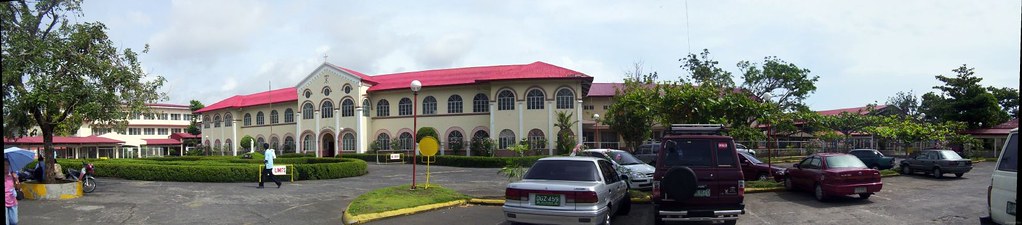
For my first SketchUp project, I attempted to create a 3D model of my school (elementary and high), St. Agnes’ Academy, since I have a fairly accurate memory of every nook and cranny of it, having spent more than 10 years there. It’s basically just a simple 3D model of the buildings' layout within the campus. However, it is not accurate since I did not rely on exact measurements of the campus’ dimensions but on the satellite imagery provided by Google Earth. It's not even finished yet - it lacks doors, windows, and other architectural details which I may not have the time and expertise to accomplish. Still, I think my 3D model fairly captures the distinct shapes and dimensions of the buildings.

St. Agnes' Academy

Simple 3D Model of St. Agnes' Academy

I uploaded my SAA model to the Google 3D Warehouse. When I have more time to waste I'll try to refine this model and maybe even create more 3D models. Currently, there are only five 3D models of buildings and landmarks in Legazpi City. The other models are by Neil, my co-forumer in SkyscraperCity. You can also check out other Philippine 3D models created using SketchUp. If you have the interest to create 3D models, and more importantly, if you’ve got a LOT of time in your hands and a ton of patience, try Google SketchUp. It’s fun!

Saturday, July 21, 2007

Proudly Pinoy!

Last June 12, 2007, ProudlyPinoy.org launched a competition to design a logo that can be displayed on Philippine websites and blogs. Basically the idea was to "create a logo which expresses the pride of being Filipino, and which will allow a web site to elegantly declare its Philippine identity".

Hundreds of entries were submitted and it seemed that finding the best one was daunting, considering the excellent entries posted. Iba talaga ang galing ng Pinoy. The entries were superb! Finally, the competition wrapped up last July 19. The winning logo, designed by Joe Talisic, is a simple but beautiful design depicting a stylized Philippine flag. I like it and I think the judges chose the right logo. The runners-up were also top-notch! I'm digging that "Rizal as Clark Kent/Superman" logo. Haha

The judges' comments about the logo: This logo has it all. It is perfectly balanced, has excellent visual impact, yet remains elegant and graceful. The Filipino identity is immediately obvious. The message is fairly clear - one gets a sense of warmth and caring, and love, which, unlike in other nations, are attributes that are considered more important in the Philippines than any other character trait. Hence the logo superbly expresses what makes us proud to be Filipinos.

So if you are proudly Pinoy and you have a website or blog, express your pride and use this logo now. Click here to get a copy of the logo. Spread the word to your friends too and ask them to support this project and show their pride by using this logo. :-)

Monday, July 16, 2007

Web Finds: Photographs that Changed the World

Life Magazine, established in 1936, was one of the most popular publications that put emphasis on photojournalism. In fact, it was the first all-photography U.S. news magazine. Over the years, Life has published in its pages thousands of photographs from all over the world that captured both the mundane and the profound; both the fleeting and the unforgettable; and both the insignificant and world-changing.

One website I encountered while browsing for Photography (one of my passions) resources is The 100 Photographs that changed the World, as published in Life Magazine. Although the claim that these photographs indeed changed the world is dubious, It cannot be denied that these photos captured the interest of the public all over the world and may in one way or another influenced actions and decisions. Another remarkable site on the same topic is Slate.com's Pictures that Changed the World.

Although the two sites featured less than the supposed 100, the selection of photos presented were undeniably powerful. It's mind-boggling how a simple photo of a wide-eyed, rather plain-looking girl can be called world-changing. But if it's a photo of Anne Frank, one understands. Most of the photos explicitly showed the sordid reality of human folly and its effects.

War, famine, death, terrorism and injustice are condensed into a few photos - from the shocking photo of a dying Igbo child afflicted with a degenerative disease to a photo of a lynching mob looking grotesquely happy while their two black victims hang dead on a tree. As one of the captions says: the images remind us that we have not come as far from barbarity as we’d like to think.

Still, there are positive images that reminds us of the heights we have reached over the last century - from that old photo capturing the moment when the Wright brother's strange contraption realized man's millenia-old dream to fly all in a few seconds, to the amazing image of our planet, shining amidst the pitch black of outer space, captured by astronauts on the moon.

I hope you take the time to check out these two sites and appreciate the value of these images just as I did. The photos may or may not evoke something. Because in the end, the power of a picture is in the mind of the beholder.

Monday, June 25, 2007

Web Finds: Wikipedia

Everyone probably knows that Wikipedia is the world's largest online encyclopedia, where anyone can research about almost any topic there is. The good thing about Wiki is the huge amount of information available for free. Also, anyone can edit the articles to add more information. Unfortunately, that's the tricky side of Wiki. Pages are prone to hacking which makes the authenticity and reliability of some information questionable.

For someone like me who counts thick encyclopedias as some of his favorite books of all time, Wikipedia is heaven. That's why I can spend countless hours just browsing aimlessly through the site. Wiki-hopping is actually one of my hobbies. haha. Usually I start from the homepage and click on whatever link that looks interesting. When researching about a topic, the links can be very distracting and I usually find myself clicking away merrily. Sometimes i find myself on a topic light-years away from my starting point.

Apparently, Wikipedia isn't only for researching about a particular topic. There are other interesting things you can do while on Wiki. I came across this article on Neomeme.net featuring nine cool things you can do with Wikipedia. Check them out.
  • TV Episode Guide. Just search for “list of ____ episodes” with the name of the show, and you will see every episode catalogued and summarized, often with trivia and other factoids.
  • Cliffs Notes Replacement. Don’t want to read that weighty tome for your literature class? Don’t worry, Wikipedia is on your side. Just type in the name of the book, and you will be presented with a plot summary, themes, symbols, and other in-depth analysis.
  • Learning Activities. This is from Wikiversity, a Wikipedia sister site. Whether you are a student wanting extra practice for a difficult subject or a teacher looking for homework assignments or handouts for your students, Wikiversity provides tutorials and worksheets on subjects ranging from AJAX programming to Philosophy. Wikiversity is currently woefully incomplete, but many subject have lengthy, well-written tutorials.
  • Stock Images Collection. Need royalty-free stock images for your next web design or desktop publishing project? Turn to Wikimedia Commons, where you can browse images by subject, licence, or author. So if you need, for example, a radioactive Diderot for that big presentation to the investors, you’re all set.
  • Music Database. Want to discover new music? Wikipedia has extensive cataloguing of music by genre, making it easy to find similar bands to those you already like.
  • Time Capsule. Want to know what people thought of a topic years ago? Wikipedia archives all changes, so simply by clicking on the “history” tab on top of the page and then “Earliest” on the very bottom you can see an article as it was written years ago. Aside from demonstrating the fluid and ever-changing nature of Wikipedia, but also offers a glimpse into how people thought years ago. The value of this technique will increase over the years as Wikipedia gets older.
  • Future Planner. Just as it can go backward in time, Wikipedia can also go backward forward. Wikipedia has articles stretching far into the next millennium. Want to see what you need to schedule for 2008? How about the World Cup in 2038? And be sure(assuming you’ve reached immortality) to pencil in the unsealing of that time capsule in 8113 AD.
  • Trend Tracker. Perhaps even more important than what people are searching for on Google or other search engines is what people are researching. This page show the most popular Wikipedia articles. For example, following the Super Bowl, a lot of people went to research Prince,whose search numbers spiked recently. A list of sexual positions, however, remains an all-time favorite. Which brings us to our next and final topic:
  • Teacher of Sex Positions. The list is more comprehensive than most books on the topic, complete with pictures. Hell, you can even use Wikipedia to look for porn.
Source: Neomeme.net

Wednesday, June 20, 2007

Where have I been?

Traveling is right on the very top of my i-want-to-but-some-circumstances-doesn't-allow-me-to list. I haven't even been to some of the best destinations here in Bicol. So it isn't a surprise that I got a D in this popular Lakbayan test which I think everyone in the Pinoy blogosphere already have in their respective blogs. Oh well, It seems I have 'miles to go before I sleep get an A'. hehe

Update [8.16.8]

After trips to Bohol and Boracay for this year, my Lakbayan grade is now a C-. Looking forward to the next upgrade! Hehe


My Lakbayan grade is C-!

How much of the Philippines have you visited? Find out at Lakbayan!

Created by Eugene Villar.

Sunday, May 6, 2007

My (So-called) Visual DNA


Found this interesting tool while blog-hopping. It's supposed to show your 'Visual DNA' or the type of personality you have based on the pictures you choose. To get your Visual DNA, you have to answer a number of questions by choosing the picture that feels right. For example, when asked what your idea of a vacation is, you can choose from several pictures showing a beach, road, mountains, etc. The tool then analyzes your personality based on these selections.

They say pictures are worth a thousand words. So maybe they can say a thing or two about someone's personality. I think the results of my own Visual DNA are fairly accurate, although of course, you can't condense a thing as complex as personality into a few photos.

The site also lets users find people with similar choices and link up with them, by the way. I couldn't care less, though. LOL.

Wednesday, August 16, 2006

SkyscraperCity


Ever since I was a kid, I have always been fascinated by architecture, urban planning and the art of building habitable spaces. I remember I used to doodle my own versions of skyscrapers and houses on the last pages of my school notebooks, especially when the lessons get all too boring. And in the really boring subjects, I think there were more doodles than notes. LOL. Even before PC games such as SIM City were popular, I already had my own city, complete with wide avenues, seaports and airports, residential and commercial zones, etc. haha.

I also used to pore over news articles of new and upcoming building projects in Manila, even though I barely understood some of them. I actually kept some of those full page ads of new skyscraper projects (though I have already lost them). I’d really get hyped up when a new project was announced through the papers. Back when the Petron Megaplaza was still the tallest building in the country, I conceptualized my own tallest building on the back of a pad paper using a ballpoint pen. (You may be wondering why I didn’t pursue architecture in college, but that’s a different story altogether, LOL.

Anyway, I still love architecture, urban planning and skyscrapers. Thus, it is no wonder that one of my favorite websites is related to these interests of mine. I have been a member of SkyscraperCity forums for almost 2 years now. I discovered the site while browsing for aerial photos of the Philippines. Since then, I have been hooked by the huge wealth of information (and photos) of skyscrapers, cities, towns and other development-related topics. Some of my co-forumers have also become my friends too, although only through the web. So there, if ever you have the same interest in architecture, urban planning, photography, history and general development topics, I highly recommend SkyscraperCity forums, my fave online tambayan.

Albay in Google Earth

In the most recent Google Earth update last month, several towns and one city in the province of Albay now have high-resolution satellite i...