Friday, July 20, 2007

Is it the End of the Line for Harry Potter?

Well, technically it IS the end of Harry Potter, or so the author says. Deathly Hallows is the last book in the series and J.K. Rowling has no plans of writing about a middle-aged Harry. But as the world waits with bated breath for the launch of the seventh and the last book (tomorrow, July 21 to be exact) speculations on the boy wizard’s ultimate fate have reached fever pitch. Especially after J.K. hinted at the possibility of killing her main character.

Will Harry die in a climactic battle with Voldemort or will he finally triumph over his nemesis? Who are the two major characters who will meet their end in the hands of 'pure evil'?

Personally, I’d rather see Harry live. I mean it wouldn’t be worth all that trouble he went through from Book 1 to 7 just for him to die in the end. On the other hand, I actually wouldn’t mind if he dies, perhaps in an ultimate act of sacrifice for his friends. I think that would really make an impact. If it does happen, I just hope J.K. will handle his death in a way that will justify everything that the lightning-scarred, bespectacled hero suffered. I can just imagine millions of wide-eyed kids bursting into tears if that happens. lol

The best thing that can happen though is if he does triumph over Voldemort, finally vanquishing He-who-must-not-be-named in a spectacular battle, and then accidentally trips and falls over his wand which stabs him directly in the heart, thus leading to his demise. Haha. Kidding.

Anyway, as much as I want to know the fates of Harry, Hermione and Ron as soon as possible, I think I’ll skip the spoilers and stick to reading the books until the very last page of the very last book - even though I might get my hands on a copy of Deathly Hallows months after everyone in the world has read it 5 times over.

Art by Deanna Molinaro

Thursday, July 19, 2007

Dex Recommends: Free Image Editing Software

Do you find MS Paint's functions too basic and you need more image editing features when working with your photos? Are you a wannabe photographer like me who needs an easy-to-use but costless photo editing and manipulation software? If you don't have access to, or have very limited knowledge in Photoshop and other professional image manipulation software you can opt for more user-friendly but effective software you can download for free. Here are some image editing software I use:

Picasa - If you need an idiot-proof and very easy-to-use image editing software and photo organizer, Picasa is highly recommended. It is a freeware application now owned by Google which helps you clean up your digital photo collection by easily locating and organizing the photos in your computer. The best features Picasa offers are the basic photo editing tools such as color enhancement, red-eye reduction, cropping and many more. You can also add effects that can transform your photos from ordinary to exciting in just a click of a button.

Neat Image - Does your digital photo look grainy and rough? That's called image noise. Unless you intentionally want a grainy looking photo, these visible image noise can be quite annoying. Now, you can reduce image noise in your digital photos with the help of one application: Neat Image. This app makes your images look better by reducing the visible noise and grain. You can even use it to even out skin tone or smoothen your portraits for a picture-perfect finish. Just don't overdo it or you'll end up looking like a very smooth balloon.

Paint.NET - Do you want a less costly (Read: free) alternative to Photoshop with most of the functions you need right at your fingertips? Then you should definitely try Paint.NET. I have been using this app for two years now -- basically for minor editing tasks -- and it works like a charm.I have yet to unlock the full capability of Paint.NET, though, since I still have limited knowledge of most of its functions. But it's definitely a permanent fixture in my list of must-have applications.

The GIMP - Short for GNU Image Manipulation Program, GIMP is another top-notch photo retouching and image manipulation software that offers almost all the functionality of Photoshop but none of the cost. GIMP can process digital graphics and photographs with excellent results. I have yet to fully use GIMP's features though. Anybody want to give me free lessons on how to use GIMP? Hehe

FastStone Photo Resizer 2.4 - Want to protect your photo from plagiarism? Add a text watermark to it using FastStone's Photo Resizer/image converter. It also lets you rename, resize, crop, rotate and change the color depth of your photos in a quick and easy batch mode.

Picture Resizer 2.0 - This is a no-fuss, easy to use Photo Resizer that takes up very little space in your computer. Simply download the file to your desktop, which appears as a simple icon, then drag and drop your image files on the application icon to resize. By default, the app resizes pictures to 400 pixels but you can change the size by renaming the icon -- for example, rename to Photoresize200.exe to produce 200-pixel images.

So there, all these applications are freeware and they're readily available on the net. Just click on the links I provided. If you have other image editing software in mind, don't forget to leave a comment. :-)

Tuesday, July 17, 2007

Pinoy Transformers


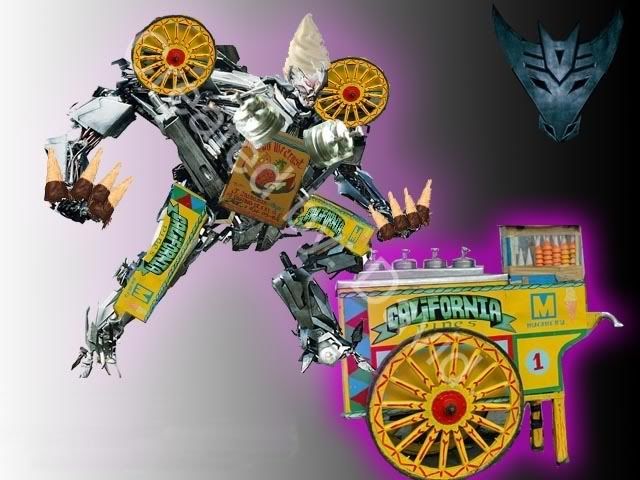
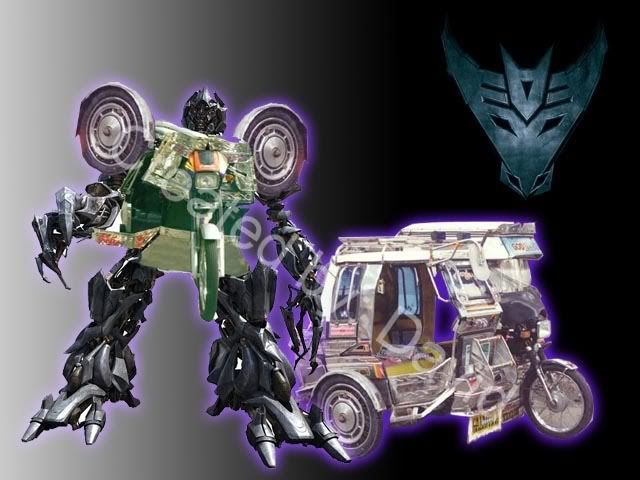
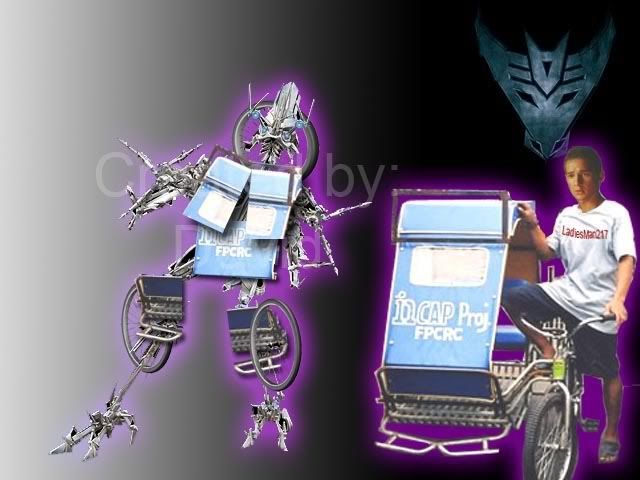
If you think the latest Transformers movie rocked, wait till you see the Pinoy version. haha. Check out BumbleJEEP. Sarao pa gayud ini. Eat your heart out Chevrolet Camaro! I like StrICEsCREAM and OptiBUS Prime na Victory Liner. Olops, my colleague forwarded these to me earlier. Credits to David, of course, whoever he is.

More after the jump

StrICEsCREAM

OptiBUS Prime

MegaTRIKE

FrenZYKAD

BarriCART

Monday, July 16, 2007

Web Finds: Photographs that Changed the World

Life Magazine, established in 1936, was one of the most popular publications that put emphasis on photojournalism. In fact, it was the first all-photography U.S. news magazine. Over the years, Life has published in its pages thousands of photographs from all over the world that captured both the mundane and the profound; both the fleeting and the unforgettable; and both the insignificant and world-changing.

One website I encountered while browsing for Photography (one of my passions) resources is The 100 Photographs that changed the World, as published in Life Magazine. Although the claim that these photographs indeed changed the world is dubious, It cannot be denied that these photos captured the interest of the public all over the world and may in one way or another influenced actions and decisions. Another remarkable site on the same topic is Slate.com's Pictures that Changed the World.

Although the two sites featured less than the supposed 100, the selection of photos presented were undeniably powerful. It's mind-boggling how a simple photo of a wide-eyed, rather plain-looking girl can be called world-changing. But if it's a photo of Anne Frank, one understands. Most of the photos explicitly showed the sordid reality of human folly and its effects.

War, famine, death, terrorism and injustice are condensed into a few photos - from the shocking photo of a dying Igbo child afflicted with a degenerative disease to a photo of a lynching mob looking grotesquely happy while their two black victims hang dead on a tree. As one of the captions says: the images remind us that we have not come as far from barbarity as we’d like to think.

Still, there are positive images that reminds us of the heights we have reached over the last century - from that old photo capturing the moment when the Wright brother's strange contraption realized man's millenia-old dream to fly all in a few seconds, to the amazing image of our planet, shining amidst the pitch black of outer space, captured by astronauts on the moon.

I hope you take the time to check out these two sites and appreciate the value of these images just as I did. The photos may or may not evoke something. Because in the end, the power of a picture is in the mind of the beholder.

Friday, July 13, 2007

About my new Layout

Technically, it's not really a new layout.

I simply tweaked the CSS code of Blogger's classic Rounders Template. I'm not really proficient in CSS but with the help of trusty old Google and common sense, I managed to change the background image, made the header, body and sidebars translucent, and changed the color of the texts and links. I have a little problem though, how do I make the images opaque in a translucent box? Somebody help me! hehe. It's still buggy -- works perfectly fine on IE but is a bit sluggish on Firefox 2. It might be all these translucent boxes that's dragging the layie down. Hmm, i'll try to fix this when I have more time.

*Update: I ditched the translucent effect on the body. Sa header and profile box na lang. hehe. For some reason the translucent effect doesn't work on IE. Tsk. Dipisil ang dai tatao, trial and error lang. hehe

By the way, many thanks to Vladstudio for my new background image. It's called Terre Lointaine, (whatever that means). I chose it because it looks great and has that eerie, artsy-fartsy, Tim Burton-ish vibe to it. The colors are cool, too.

Monday, June 25, 2007

Web Finds: Wikipedia

Everyone probably knows that Wikipedia is the world's largest online encyclopedia, where anyone can research about almost any topic there is. The good thing about Wiki is the huge amount of information available for free. Also, anyone can edit the articles to add more information. Unfortunately, that's the tricky side of Wiki. Pages are prone to hacking which makes the authenticity and reliability of some information questionable.

For someone like me who counts thick encyclopedias as some of his favorite books of all time, Wikipedia is heaven. That's why I can spend countless hours just browsing aimlessly through the site. Wiki-hopping is actually one of my hobbies. haha. Usually I start from the homepage and click on whatever link that looks interesting. When researching about a topic, the links can be very distracting and I usually find myself clicking away merrily. Sometimes i find myself on a topic light-years away from my starting point.

Apparently, Wikipedia isn't only for researching about a particular topic. There are other interesting things you can do while on Wiki. I came across this article on Neomeme.net featuring nine cool things you can do with Wikipedia. Check them out.
  • TV Episode Guide. Just search for “list of ____ episodes” with the name of the show, and you will see every episode catalogued and summarized, often with trivia and other factoids.
  • Cliffs Notes Replacement. Don’t want to read that weighty tome for your literature class? Don’t worry, Wikipedia is on your side. Just type in the name of the book, and you will be presented with a plot summary, themes, symbols, and other in-depth analysis.
  • Learning Activities. This is from Wikiversity, a Wikipedia sister site. Whether you are a student wanting extra practice for a difficult subject or a teacher looking for homework assignments or handouts for your students, Wikiversity provides tutorials and worksheets on subjects ranging from AJAX programming to Philosophy. Wikiversity is currently woefully incomplete, but many subject have lengthy, well-written tutorials.
  • Stock Images Collection. Need royalty-free stock images for your next web design or desktop publishing project? Turn to Wikimedia Commons, where you can browse images by subject, licence, or author. So if you need, for example, a radioactive Diderot for that big presentation to the investors, you’re all set.
  • Music Database. Want to discover new music? Wikipedia has extensive cataloguing of music by genre, making it easy to find similar bands to those you already like.
  • Time Capsule. Want to know what people thought of a topic years ago? Wikipedia archives all changes, so simply by clicking on the “history” tab on top of the page and then “Earliest” on the very bottom you can see an article as it was written years ago. Aside from demonstrating the fluid and ever-changing nature of Wikipedia, but also offers a glimpse into how people thought years ago. The value of this technique will increase over the years as Wikipedia gets older.
  • Future Planner. Just as it can go backward in time, Wikipedia can also go backward forward. Wikipedia has articles stretching far into the next millennium. Want to see what you need to schedule for 2008? How about the World Cup in 2038? And be sure(assuming you’ve reached immortality) to pencil in the unsealing of that time capsule in 8113 AD.
  • Trend Tracker. Perhaps even more important than what people are searching for on Google or other search engines is what people are researching. This page show the most popular Wikipedia articles. For example, following the Super Bowl, a lot of people went to research Prince,whose search numbers spiked recently. A list of sexual positions, however, remains an all-time favorite. Which brings us to our next and final topic:
  • Teacher of Sex Positions. The list is more comprehensive than most books on the topic, complete with pictures. Hell, you can even use Wikipedia to look for porn.
Source: Neomeme.net

Wednesday, June 20, 2007

Where have I been?

Traveling is right on the very top of my i-want-to-but-some-circumstances-doesn't-allow-me-to list. I haven't even been to some of the best destinations here in Bicol. So it isn't a surprise that I got a D in this popular Lakbayan test which I think everyone in the Pinoy blogosphere already have in their respective blogs. Oh well, It seems I have 'miles to go before I sleep get an A'. hehe

Update [8.16.8]

After trips to Bohol and Boracay for this year, my Lakbayan grade is now a C-. Looking forward to the next upgrade! Hehe


My Lakbayan grade is C-!

How much of the Philippines have you visited? Find out at Lakbayan!

Created by Eugene Villar.

Albay in Google Earth

In the most recent Google Earth update last month, several towns and one city in the province of Albay now have high-resolution satellite i...